
Computers are used for study, work, communication, and entertainment. To use a computer more easily, people often add extra devices and tools. Learning computer accessories names helps students, beginners, and English learners understand common computer-related items in simple English.
In this article, you will learn computer accessories in English through clear and useful categories. You will also learn the names of common input devices, display tools, storage items, cables, laptop add-ons, and other useful accessories used with computers.
In This Page
Common Computer Accessories and Devices
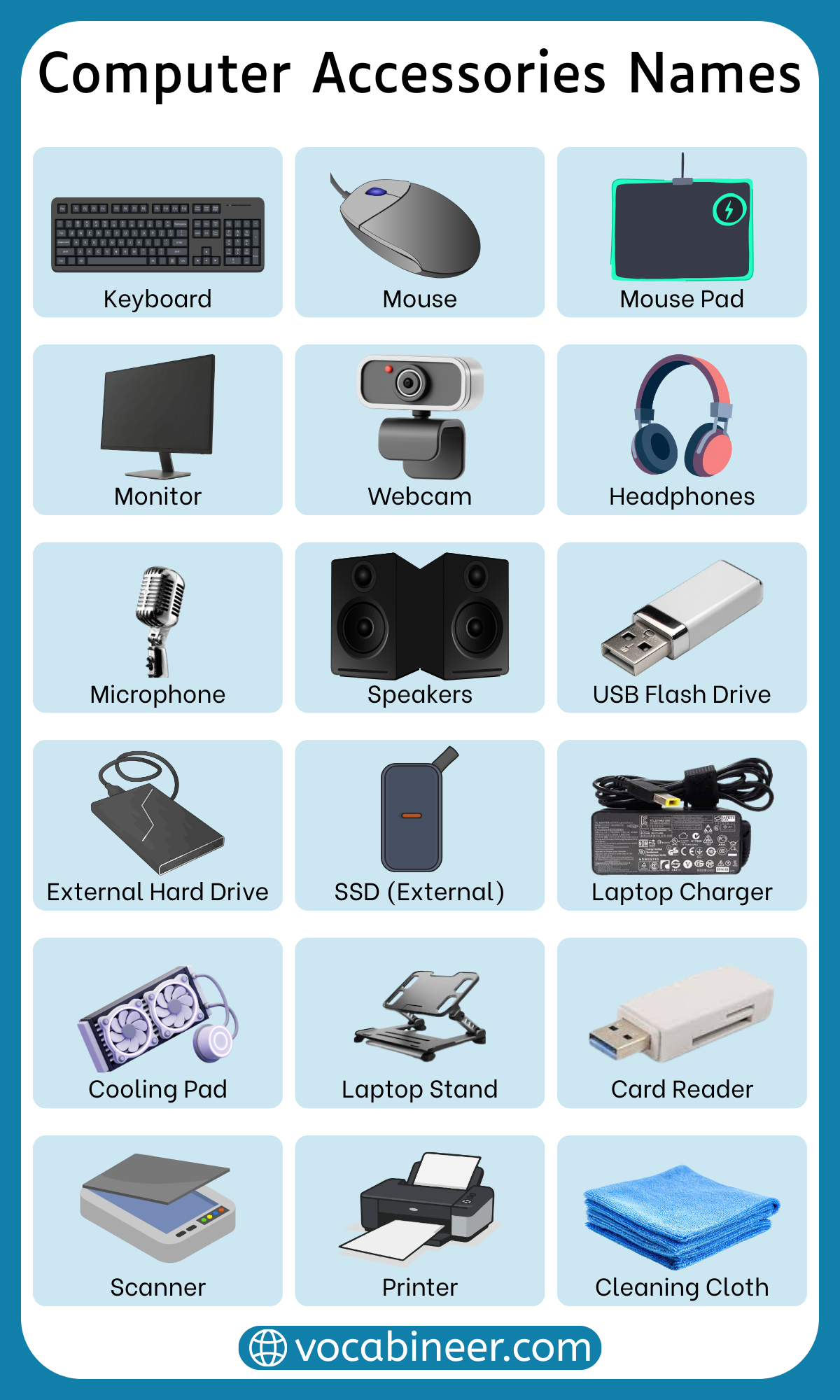
Here are some of the most common computer accessories people use:
- keyboard
- mouse
- monitor
- printer
- webcam
- speakers
- headphones
- microphone
- USB flash drive
- external hard drive
- USB hub
- HDMI cable
- Wi-Fi adapter
- laptop stand
- cooling pad
- docking station
Input Devices and Control Tools
These accessories are used to enter data and control the computer:
- Keyboard: a device used for typing letters, numbers, and symbols
- Mouse: a device used for moving the pointer and clicking
- Touchpad: a flat surface used to control the cursor
- Scanner: a device used for copying documents or pictures into a computer
- Graphics tablet: a tool used for drawing or design work on a computer
- Stylus pen: a pen-like tool used with tablets and touch screens
- Trackball mouse: a mouse with a rolling ball used for pointer control
Output Devices and Display Equipment
These accessories are used to show, print, or play information from a computer:
- Monitor: a screen used to display text, pictures, and videos
- Printer: a machine used to print documents and images
- Projector: a device used to show computer images on a large screen
- Speakers: devices used to play sound out loud
- Headphones: devices worn on the ears for private listening
- Headset: headphones with a microphone attached
- Monitor stand: a stand used to raise a monitor to a better height
Storage Devices and Data Tools
These accessories are used for saving, moving, and reading data:
- USB flash drive: a small device used to store and transfer files
- External hard drive: a storage device used outside the computer
- External SSD: a fast external storage device used for files and backups
- Memory card: a small card used for storing data
- Memory card reader: a device used to read memory cards
- Backup drive: a drive used for saving extra copies of files
- SSD enclosure: a case used to connect a storage drive externally
Power Supply and Connectivity Accessories
These accessories help power the computer and connect it to other devices:
- Power cable: a cable used to give electricity to a device
- Charger: a device used to charge a laptop battery
- UPS: a backup power device used during power cuts
- Surge protector: a device used to protect electronics from sudden power changes
- Extension cord: a wire used to connect devices farther away
- Wi-Fi adapter: a device used to connect a computer to wireless internet
- Bluetooth adapter: a device used to add Bluetooth connection to a computer
- USB hub: a device that adds more USB ports
Computer Cables, Adapters, and Connectors
These items help connect the computer to screens, printers, storage devices, and networks:
- HDMI cable: a cable used for video and audio connection
- USB cable: a cable used to connect many computer devices
- Ethernet cable: a cable used for wired internet connection
- VGA cable: a cable used for older video connections
- DisplayPort cable: a cable used for high-quality video output
- Audio cable: a cable used to connect sound devices
- HDMI adapter: an adapter used to connect different video ports
- USB adapter: a small connector used to fit different USB types
- Card reader: a device used to connect and read storage cards
Audio and Video Accessories
These accessories improve sound and video use on a computer:
- Webcam: a camera used for video calls and recording
- Microphone: a device used for speaking, meetings, and recording audio
- Ring light: a light used for better video quality
- Capture card: a device used to record video from another device
- Pop filter: a screen used to reduce strong sounds while speaking into a microphone
- Webcam cover: a small cover used for camera privacy
- Headset stand: a stand used to hold headphones or a headset neatly
Useful Laptop Accessories and Add-Ons
These accessories are especially useful for laptop users:
- Laptop stand: a stand used to raise a laptop to a better height
- Cooling pad: a pad with fans used to cool a laptop
- Laptop sleeve: a soft cover used to protect a laptop
- Docking station: a device used to connect many accessories quickly
- Portable charger: a battery device used to charge laptops or other devices
- Screen protector: a thin protective layer for the screen
- Keyboard cover: a cover used to protect the keyboard from dust
- Laptop charger: a charger used for powering a laptop
- Laptop bag: a bag used to carry a laptop safely
Cleaning and Protection Items
These accessories help keep a computer clean, safe, and organized:
- Screen cleaner: a liquid used for cleaning screens
- Microfiber cloth: a soft cloth used for cleaning without scratches
- Dust blower: a tool used to blow dust away
- Cleaning brush: a small brush used for removing dirt from tight spaces
- Cable organizer: an item used to keep cables neat
- Monitor cleaner: a cleaner used for monitor screens
- Surge protector: a device used to protect electronics from power problems
Gaming Accessories and Setup Tools
These accessories are often used by gamers for better control, sound, and comfort:
- Gaming mouse: a mouse made for faster and more accurate control
- Gaming keyboard: a keyboard designed for gaming use
- Gaming headset: a headset used for game sound and voice chat
- Mouse pad: a pad used under the mouse for smoother movement
- Controller: a handheld device used to play games
- RGB light strip: colored lights used for computer setup decoration
- Headset stand: a stand used to hold a gaming headset
Computer Accessories for Beginners
A beginner does not need too many accessories at first. These are some of the most useful beginner-friendly computer accessories:
- Keyboard: for typing
- Mouse: for easy control
- Monitor: for clear display
- Headphones: for listening
- USB flash drive: for saving files
- Webcam: for online classes or meetings
- Laptop stand: for better screen height
- USB hub: for adding more ports
Summary
Computer accessories names include input devices, output devices, storage tools, cables, adapters, laptop add-ons, audio-video items, and cleaning tools. Common examples include keyboard, mouse, monitor, printer, webcam, speakers, USB flash drive, HDMI cable, docking station, and laptop stand. Learning these names makes it easier to understand computer equipment and talk about computer accessories in English.
FAQs
Common computer accessories include keyboard, mouse, monitor, printer, speakers, headphones, webcam, USB flash drive, HDMI cable, docking station, and laptop stand. These items are widely used for study, work, and daily computer use.
Input devices are accessories used to enter data into a computer, such as keyboard, mouse, scanner, and graphics tablet. Output devices are used to show or play information from a computer, such as monitor, printer, speakers, and projector.
Storage devices used with computers include USB flash drive, external hard drive, external SSD, memory card, memory card reader, and backup drive. These accessories help store, move, and protect files.
Useful laptop accessories include laptop stand, cooling pad, laptop sleeve, docking station, portable charger, keyboard cover, and screen protector. These items help improve comfort, protection, and connectivity.
Learning computer accessories names helps with school, office work, shopping, and daily English communication about technology. It also makes it easier to understand computer setup guides and product descriptions.
Read More
- Mobile Phone Accessories
- Sportswear Items Names
- Sports Equipment Names
- Different Types of Clothes
- Religious Symbols Names
- Beach Items Names