
Programming symbols are special characters that replace words and actions in code, allowing instructions to be written in a clear and compact form. They tell the computer how to perform operations, compare values, group instructions, and control the flow of a program step by step. By using symbols, programmers can write logic in fewer characters while keeping meaning precise. Symbols also help keep coding styles consistent across many programming languages, which makes it easier to learn new languages. Understanding the names and meanings of these symbols helps learners read code with confidence, follow examples accurately, and avoid common syntax and logic errors while writing programs.
In This Page
Common Programming Symbols
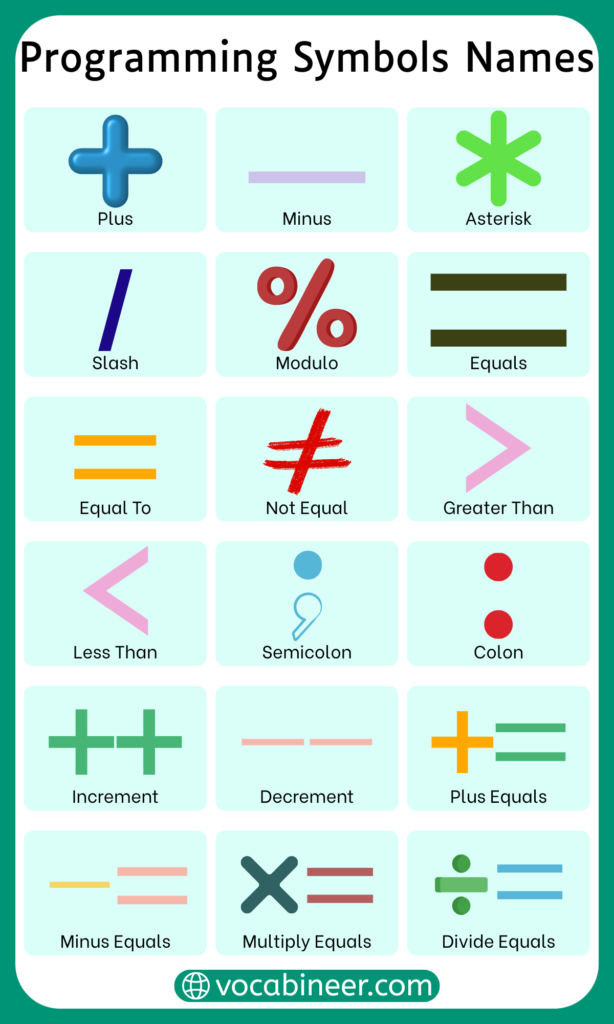
Programming symbols are the special characters that appear most often in code across many programming languages. These symbols control calculations, comparisons, structure, and data flow. Learning their names and uses helps readers understand code logic, follow examples, and avoid basic syntax mistakes.
- The Plus sign (+) is used to add values and, in some languages, join text strings.
- The Minus sign (-) subtracts values or represents negative numbers.
- The Asterisk (*) is used for multiplication and sometimes for special operations like pointers or repetition.
- The Slash (/) performs division and is also used in comments or paths.
- The Percent sign (%) finds the remainder after division.
- The Equals sign (=) assigns a value to a variable.
- The Double equals (==) checks whether two values are equal.
- The Not equals (!=) checks whether values are different.
- The Greater than sign (>) compares two values to see which is larger.
- The Less than sign (<) compares values to check which is smaller.
- The Parentheses ( ) group expressions and hold function parameters.
- The Curly braces { } define blocks of code such as functions or loops.
- The Square brackets [ ] access elements in arrays or lists.
- The Semicolon (;) ends statements in many programming languages.
- The Comma (,) separates items, values, or parameters.
- The Dot (.) accesses object properties or methods.
- The Colon (:) appears in conditions, mappings, or type declarations.
- The Question mark (?) is used in conditional expressions in some languages.
- The Ampersand (&) appears in logical and bitwise operations.
- The Pipe (|) is used for logical OR or command chaining.
Symbols Found Across Programming Languages
Some symbols are shared by many programming languages, even if the language syntax is different. These symbols help programmers switch between languages more easily.
- Arithmetic symbols like +, –, *, and / appear in most languages
- Comparison symbols such as ==, !=, >, and < are widely used
- Grouping symbols like ( ), { }, and [ ] define structure
- Assignment symbols like = appear in almost every language
- Comment symbols vary, but the idea is universal
Operators Used in Programming
Operators are symbols that perform actions on values and variables. They are a core part of programming logic and appear in nearly every line of code.
Arithmetic operators handle calculations using symbols like +, –, *, /, and %. Comparison operators use symbols such as ==, !=, >, and < to compare values. Logical operators often combine conditions using symbols like &&, ||, and !. Assignment operators use = and combinations like += or -= to store or update values.
Arithmetic Symbols in Code
Arithmetic symbols are used to perform basic mathematical operations in programming. These symbols help calculate values, update variables, and process numeric data inside a program.
- The Plus sign (+) adds numbers and is also used to join text in some languages
- The Minus sign (-) subtracts values or represents negative numbers
- The Asterisk (*) multiplies numbers and may indicate repetition or pointers
- The Slash (/) divides values
- The Percent sign (%) finds the remainder after division
- The Increment symbol (++) increases a value by one
- The Decrement symbol (–) decreases a value by one
Comparison Symbols and Their Meanings
Comparison symbols are used to check relationships between values. They return results like true or false, which helps programs make decisions.
- The Double equals (==) checks if two values are equal
- The Not equals (!=) checks if values are different
- The Greater than (>) checks if one value is larger
- The Less than (<) checks if one value is smaller
- The Greater than or equal (>=) checks value limits
- The Less than or equal (<=) checks minimum conditions
Logical Symbols Used in Conditions
Logical symbols combine or modify conditions in programming. They help programs decide what action to take based on multiple rules.
- The Logical AND (&&) checks if all conditions are true
- The Logical OR (||) checks if at least one condition is true
- The Logical NOT (!) reverses a condition
Assignment Symbols in Programming
Assignment symbols store values in variables and update them during program execution. They are some of the most frequently used symbols in code.
- The Equals sign (=) assigns a value
- The Plus equals (+=) adds and assigns in one step
- The Minus equals (-=) subtracts and assigns
- The Multiply equals (*=) multiplies and assigns
- The Divide equals (/=) divides and assigns
Bitwise Symbols Explained Simply
Bitwise symbols work at the binary level, meaning they operate directly on bits rather than whole numbers. These symbols are commonly used in low-level programming, performance optimization, and system-related tasks.
- The Bitwise AND (&) compares bits and keeps matching ones
- The Bitwise OR (|) combines bits from two values
- The Bitwise XOR (^) keeps bits that are different
- The Bitwise NOT (~) flips bits
- The Left shift (<<) moves bits to the left
- The Right shift (>>) moves bits to the right
Symbols Used to Group Code
Grouping symbols define how code blocks and expressions are organized. They control order of execution and help keep programs readable and structured.
- Parentheses ( ) group expressions and function calls
- Curly braces { } define blocks of code
- Square brackets [ ] handle lists, arrays, or indexing
Brackets Used in Programming
Brackets are a special category of grouping symbols and are essential for structuring code correctly across languages.
- Parentheses ( ) are used for conditions and parameters
- Curly braces { } create scopes for functions and blocks
- Square brackets [ ] access array elements or indexes
Punctuation Marks in Code
Punctuation symbols separate statements and organize elements in programming languages. These symbols help define how code is read and executed.
- The Semicolon (;) ends statements
- The Comma (,) separates items and parameters
- The Dot (.) accesses object properties
- The Colon (:) appears in conditions and mappings
Special Characters Used by Programmers
Special characters in programming serve unique technical purposes beyond basic math or punctuation. These symbols often control behavior, define structure, or trigger special actions within code.
- The At symbol (@) is used for decorators, annotations, or metadata
- The Hash (#) starts comments or directives in some languages
- The Dollar sign ($) represents variables or placeholders
- The Backslash (\) escapes characters or defines paths
- The Pipe (|) is used in logical operations or command chaining
Symbols Used in Conditional Statements
Conditional symbols allow programs to make decisions based on rules. They check conditions and control which code runs next.
- Comparison symbols like ==, !=, >, and < evaluate conditions
- Logical symbols such as &&, ||, and ! combine or reverse conditions
- The Question mark (?) and Colon (:) form the ternary operator
Symbols Used in Loops and Iteration
Loops repeat actions while conditions remain true. Symbols inside loops control repetition, counting, and stopping points.
- Comparison symbols decide loop conditions
- The Increment (++) and Decrement (–) update loop counters
- Assignment symbols modify values during repetition
- Brackets group loop statements
Symbols Used in Functions and Methods
Functions rely on symbols to define parameters, return values, and execution flow. These symbols help organize reusable blocks of code.
- Parentheses ( ) hold function parameters
- Curly braces { } contain function bodies
- The Comma (,) separates parameters
- The Return arrow (=>) appears in some languages
Symbols Used in Variables and Constants
Variables and constants rely on symbols to assign values, define scope, and control how data behaves in a program. These symbols help programmers store information and reuse it throughout the code.
- The Equals sign (=) assigns values to variables
- The Colon (:) is used in type declarations in some languages
- The Dollar sign ($) appears in variable names or templates
- The Underscore (_) is often used in naming conventions
- Capital letters are sometimes combined with symbols for constants
Comment Symbols Across Languages
Comment symbols allow programmers to write notes inside code without affecting execution. They are useful for explanations, reminders, and documentation.
- The Double slash (//) starts single-line comments
- The Hash (#) begins comments in some languages
- The Slash and asterisk (/ /) create multi-line comments
- The Triple quotes (“”” “”” ) are used for documentation strings
Symbols Used in Strings and Text
String symbols handle text data inside programs. They define text boundaries and control how special characters appear.
- Quotation marks (” “) define text strings
- Single quotes (‘ ‘) define characters or strings
- The Backslash (\) escapes special characters
- The Plus sign (+) joins strings together
Symbols Used in Data Structures
Data structures use symbols to store and organize collections of data. These symbols define how items are grouped and accessed.
- Square brackets [ ] create arrays or lists
- Curly braces { } define sets or dictionaries
- The Comma (,) separates elements
- The Colon (:) pairs keys and values
Symbols Used in Object-Oriented Programming
Object-oriented programming uses symbols to represent objects, classes, and relationships between them. These symbols help manage complex programs.
- The Dot (.) accesses object properties
- The Arrow (->) references object members in some languages
- The Double colon (::) accesses class-level members
- The At symbol (@) is used for annotations
Symbols Common in Web Development
Web development uses a wide range of programming symbols to control structure, style, and behavior across websites and web applications. These symbols appear frequently in HTML, CSS, and JavaScript.
- The Angle brackets (< >) define HTML tags
- The Slash (/) closes HTML elements and separates paths
- The Hash (#) targets IDs in CSS and URLs
- The Dot (.) selects classes in CSS
- The Colon (:) applies pseudo-classes and rules
- The Semicolon (;) ends CSS statements
- The Equals sign (=) assigns values in attributes
Symbols Used in Database Queries
Database queries rely on symbols to filter data, compare values, and define conditions. These symbols are commonly seen in SQL and similar query languages.
- The Asterisk (*) selects all records
- The Equals sign (=) matches values
- The Greater than (>) and Less than (<) filter results
- The Percent sign (%) acts as a wildcard
- The Underscore (_) matches single characters
- The Comma (,) separates column names
Math-Related Symbols in Programming
Programming uses many symbols borrowed from mathematics, but their behavior can vary depending on language rules. These symbols allow programs to perform calculations and comparisons.
- Arithmetic symbols like +, –, *, and / handle calculations
- Comparison symbols such as >, <, >=, and <= compare values
- The Percent sign (%) calculates remainders
- The Caret (^) may represent power or bitwise operations
Most Frequently Used Programming Symbols
Some symbols appear far more often than others in daily programming tasks. These symbols form the foundation of most code.
- The Equals sign (=)
- The Parentheses ( )
- The Curly braces { }
- The Semicolon (;)
- The Comma (,)
- The Dot (.)
Less Common Programming Symbols
Certain programming symbols are used only in specific languages or advanced cases. These symbols may not appear often, but they still serve important roles.
- The Backtick (`) is used in templates or commands
- The Tilde (~) appears in bitwise operations
- The Double question mark (??) handles null values
- The Ellipsis (…) represents variable arguments
Programming Symbols That Are Often Confusing
Some symbols look similar or behave differently depending on context, which can confuse learners and cause errors.
- Equals (=) versus Double equals (==)
- Slash (/) versus Backslash (\)
- Ampersand (&) versus Double ampersand (&&)
- Plus (+) versus Increment (++)
Programming Symbols Compared to Math Symbols
Programming symbols and math symbols often look the same, but they do not always behave the same way. In mathematics, symbols represent abstract relationships and values, while in programming they follow strict syntax rules and control how a program runs. Knowing the difference helps learners avoid logic errors when translating math ideas into code.
| Aspect | Programming Symbols | Math Symbols |
|---|---|---|
| Main Purpose | Control logic, operations, and program behavior | Represent numeric relationships and calculations |
| Rule Source | Defined by programming language syntax | Defined by mathematical conventions |
| Output Type | Produces values, actions, or boolean results | Produces numeric or symbolic results |
| Context Sensitivity | Meaning can change by language | Meaning stays consistent across math |
| Equality Symbol | == checks equality | = shows equality |
| Assignment | = assigns a value | Not used for assignment |
| Division | / performs division with rules | ÷ or / represents division |
| Power Operation | ^ or functions handle power | ^ commonly represents exponent |
| Error Handling | Wrong use causes syntax or logic errors | Wrong use results in incorrect math |
| Usage Area | Code, software, algorithms | Equations, formulas, calculations |
Programming Symbols Compared to Keyboard Symbols
Programming symbols and keyboard symbols are closely related, but they are not the same. In programming, only a selected group of characters is used according to strict language rules. Keyboard symbols, by contrast, include all special characters available for general typing. Recognizing this difference helps learners focus on symbols that directly affect code behavior.
| Aspect | Programming Symbols | Keyboard Symbols |
|---|---|---|
| Purpose | Control logic, structure, and operations in code | Provide characters for typing and formatting |
| Rule Dependence | Follow strict programming syntax rules | Not all symbols have technical rules |
| Usage Scope | Used only inside programming languages | Used in writing, typing, and general input |
| Error Impact | Incorrect use can break code | Incorrect use usually affects appearance only |
| Examples | +, =, { }, ( ), == | @, #, $, !, _ |
| Learning Focus | Must be learned accurately | Learned through general typing |
| Context Sensitivity | Meaning depends on language | Meaning usually stays the same |
| Execution Effect | Directly affects program behavior | Does not control execution |
When to Use Programming Symbols
Programming symbols should be used whenever code needs to perform actions, make decisions, or define structure. Symbols are required when assigning values to variables, comparing data in conditions, or repeating tasks using loops. They are also used to group code, define functions, and organize data structures. Symbols must be applied according to the rules of the programming language being used. Using the correct symbols at the right time keeps code readable, prevents errors, and ensures the program behaves as expected.
Common Mistakes With Programming Symbols
Mistakes with programming symbols often happen when learners misunderstand how symbols work or use them in the wrong place. One common error is using the assignment symbol instead of the equality symbol, which can change program logic. Forgetting to close brackets or parentheses is another frequent issue that causes syntax errors. Many beginners also confuse similar-looking symbols, such as slash and backslash, or single and double equals. Placing symbols incorrectly or using extra symbols where they are not needed can also break code. Learning symbol meanings and checking placement carefully helps reduce these mistakes and improves code accuracy.
FAQs About Programming Symbols Names
Programming symbols are the spoken or written names of special characters used in code, such as plus sign, equals sign, or curly braces.
Knowing symbol names helps learners read code, follow tutorials, understand error messages, and communicate clearly with other programmers.
Many symbols are shared across languages, but their behavior or meaning can change depending on the programming language.
Some symbols look the same, but programming symbols follow language rules and may behave differently than math symbols.
Beginners should start with arithmetic symbols, comparison symbols, assignment symbols, and grouping symbols like parentheses and braces.
Conclusion
Programming symbols names explain how special characters function inside code. Learning these symbols helps readers understand programs, avoid errors, and write clearer logic across different programming languages and tasks.
Read More