

Keyboard symbols are special characters found on keys alongside letters and numbers. They are used to organize text, show relationships, perform calculations, control formatting, and add specific meaning in writing, communication, and digital tasks.
Learning common keyboard symbol names helps users identify each character, understand its purpose, and use it correctly while typing. This knowledge makes everyday tasks such as writing documents, sending messages, entering formulas, using websites, and working with digital tools more accurate and efficient.

In This Page
Common Keyboard Symbols and Their Names
Keyboard symbols appear in writing, mathematics, coding, email addresses, websites, and everyday computer use. Learning their names helps children, students, and English learners recognize common keys, read symbols correctly, and use them more confidently.
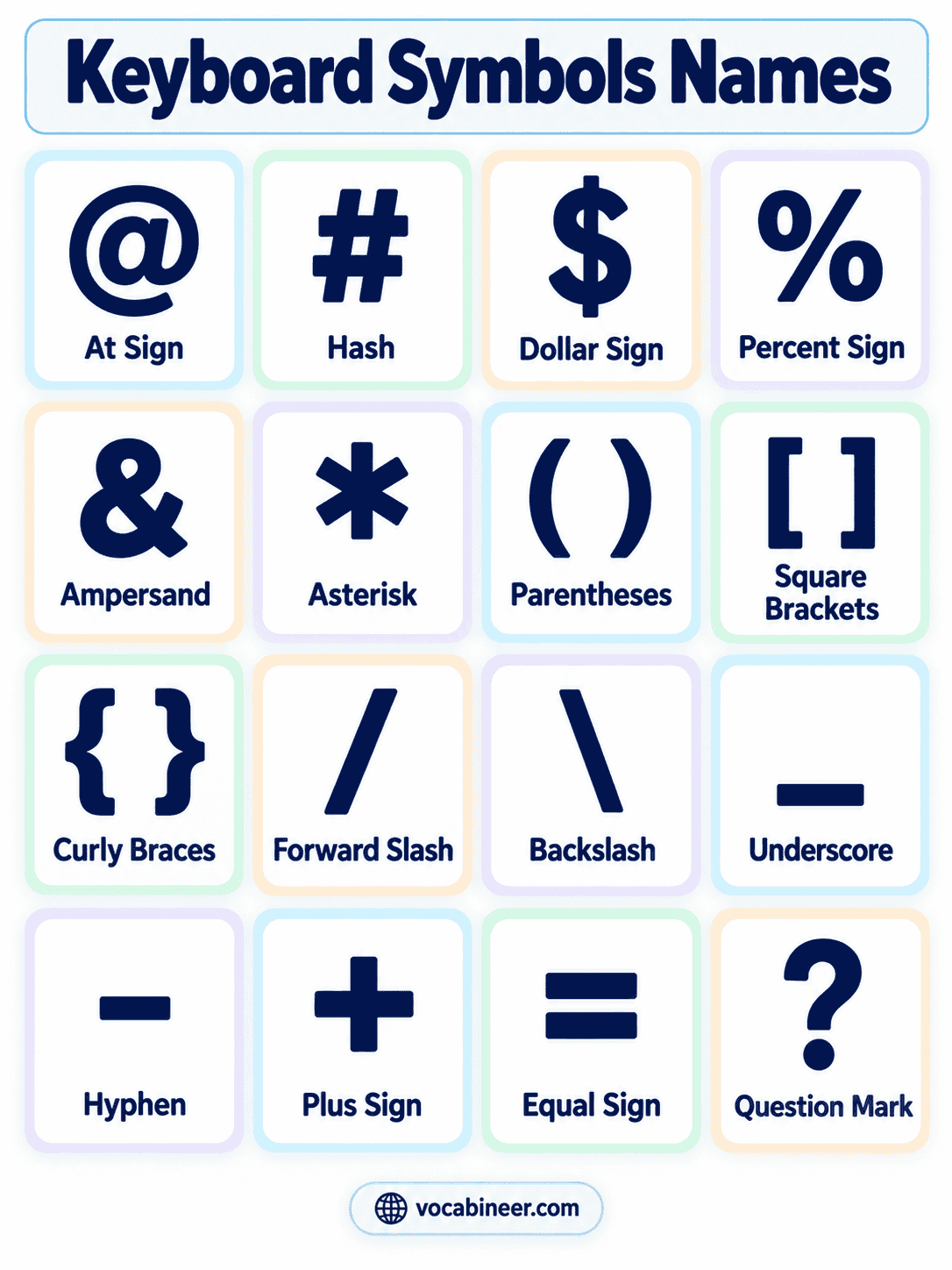
@ — At Sign
The at sign appears in email addresses, usernames, and social media handles. People read it as “at.”
# — Hash or Number Sign
The hash symbol can mark numbers, hashtags, headings, or code-related elements. In some contexts, people also call it the pound sign.
$ — Dollar Sign
The dollar sign commonly represents dollars and appears before monetary values such as $10 or $50.
% — Percent Sign
The percent sign shows a value out of one hundred. For example, 50% means fifty percent.
& — Ampersand
The ampersand represents the word “and.” People often use it in company names, titles, and informal writing.
*** — Asterisk**
The asterisk is a small star-shaped symbol used for notes, references, multiplication in some computer contexts, and special markings.
( ) — Parentheses
Parentheses enclose extra information, explanations, numbers, or other details within a sentence or expression.
[ ] — Square Brackets
Square brackets enclose added information, references, optional content, or elements in mathematics and programming.
{ } — Curly Braces
Curly braces appear in mathematics, programming, and structured data. They often group related values or blocks of code.
– — Hyphen
A hyphen joins words or word parts, as in “well-known” or “twenty-one.” It is shorter than a dash.
_ — Underscore
The underscore is a low horizontal line often used in usernames, file names, and programming when spaces are not suitable.
+ — Plus Sign
The plus sign represents addition in mathematics. It can also indicate a positive value or added feature.
= — Equal Sign
The equal sign shows that two values or expressions have the same value.
/ — Forward Slash
The forward slash separates words, dates, alternatives, or parts of web addresses. It also represents division in some contexts.
\ — Backslash
The backslash mainly appears in computing, file paths, and programming. It slopes in the opposite direction from a forward slash.
| — Vertical Bar
The vertical bar appears in mathematics, computing, and programming. It can separate options or represent specific operations.
: — Colon
A colon introduces a list, explanation, example, or related information. It also separates hours and minutes in time.
; — Semicolon
A semicolon connects closely related sentences or separates complex items in a list.
‘ — Apostrophe
An apostrophe shows possession or missing letters in contractions, as in “Sara’s book” and “don’t.”
” — Quotation Marks
Quotation marks surround direct speech, quotations, titles in some styles, or words discussed as terms.
Letter Keys and Related Symbols
Some keyboard symbols are produced using letter keys along with modifier keys like Shift or Alt. These symbols often relate to accents, special characters, or language-specific marks and are common in names, foreign words, or technical typing.
- The Ampersand (&) is typed using Shift with a number key but relates to text joining
- The Asterisk (*) is used for emphasis or multiplication
- The Caret (^) appears in math and shortcuts
- Accent symbols may appear with letter combinations
- Some symbols depend on keyboard language layout
Number Keys and Attached Symbols
Number keys on a standard keyboard often include symbols that appear when the Shift key is pressed. These symbols are commonly used in writing, math, passwords, and online communication, which makes them important to recognize by name.
- The Exclamation mark (!) appears with the number one and shows emphasis or alerts
- The At symbol (@) appears with the number two and is used in email addresses and mentions
- The Hash (#), also called pound sign, appears with the number three and is used for tags and numbering
- The Dollar sign ($) appears with the number four and represents money
- The Percent sign (%) appears with the number five and shows ratios or percentages
- The Caret (^) appears with the number six and is used in math or shortcuts
- The Ampersand (&) appears with the number seven and joins words or names
- The Asterisk (*) appears with the number eight and shows emphasis or multiplication
- The Parentheses ( ) appear with numbers nine and zero and are used for grouping
Top Row Symbols on a Standard Keyboard
The top row of a keyboard includes symbols that are often used for formatting, shortcuts, and special functions. These symbols are accessed directly or with modifier keys and are common in both writing and technical tasks.
- The Tilde (~) is used in shortcuts and informal writing
- The Backtick (`) appears in coding and formatting
- The Minus sign (-) is used for subtraction or separation
- The Equals sign (=) shows equality or assignment
- The Plus sign (+) adds values or indicates increase
- Bracket symbols help group information
Symbols on the Numeric Keypad
The numeric keypad, usually found on the right side of full-size keyboards, includes symbols mainly used for calculations and navigation. These symbols are especially useful in accounting, data entry, and math-related work.
- The Plus sign (+) adds values
- The Minus sign (-) subtracts values
- The Asterisk (*) is used for multiplication
- The Slash (/) divides numbers
- The Decimal point (.) separates whole numbers and decimals
- The Enter key symbol confirms calculations
Shift Key Symbol Combinations
The Shift key allows access to many additional symbols on a keyboard. These combinations expand the number of characters available without adding extra keys.
- Shift with number keys produces top-row symbols
- Shift with punctuation keys changes symbol output
- Many common symbols rely on Shift combinations
- Keyboard layout affects which symbols appear
Special Characters Available on Keyboard
Special characters are symbols that are not letters or numbers but still play an important role in typing. These characters are used to organize text, show meaning, or perform specific actions while writing, editing, or working on a computer.
- The At symbol (@) is used in email addresses and mentions
- The Ampersand (&) joins words or names
- The Asterisk (*) is used for emphasis or reference marks
- The Caret (^) appears in math and shortcuts
- The Tilde (~) is used in informal writing and system paths
- The Pipe (|) separates values or options
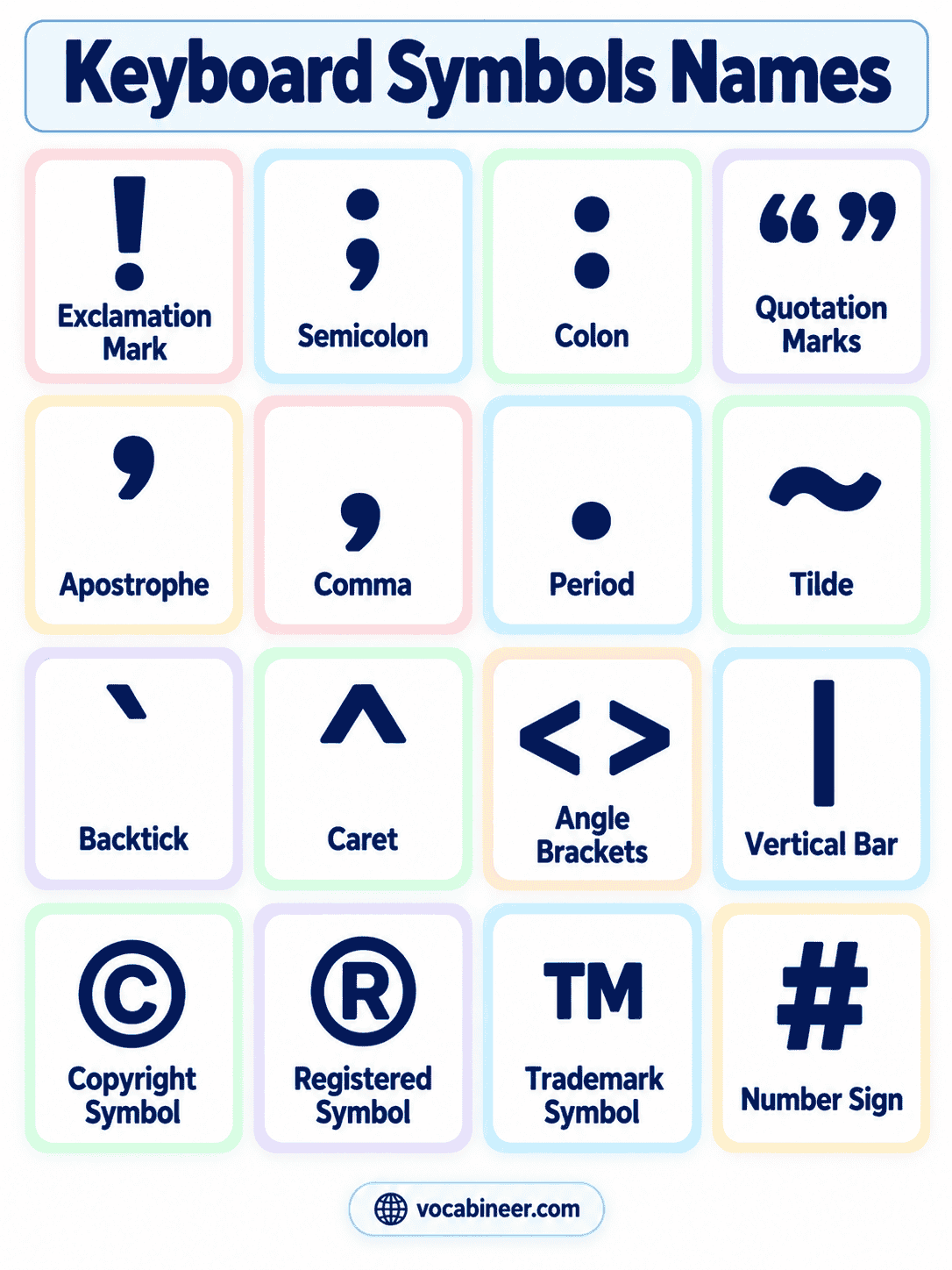
Punctuation Marks Typed Using Keyboard
Punctuation symbols help structure sentences and make writing clear and readable. These symbols guide pauses, tone, and meaning in written communication.
- The Period (.) ends statements
- The Comma (,) separates ideas or items
- The Question mark (?) shows questions
- The Exclamation mark (!) expresses strong feeling
- The Colon (:) introduces explanations or lists
- The Semicolon (;) connects related sentences
- The Quotation marks (” “) show spoken or quoted text
- The Apostrophe (‘) shows possession or contractions
Mathematical Signs on Keyboard
Math symbols on the keyboard are used for calculations, comparisons, and formulas. They appear in everyday tasks such as budgeting, studying, and data entry.
- The Plus sign (+) adds numbers
- The Minus sign (-) subtracts values
- The Equals sign (=) shows equality
- The Slash (/) represents division
- The Asterisk (*) is used for multiplication
- The Percent sign (%) shows percentage
- The Greater than sign (>) compares values
- The Less than sign (<) compares values
Currency Signs Available on Keyboard
Currency symbols represent money and financial values. Some are directly available on the keyboard, while others require special key combinations.
- The Dollar sign ($) represents currency values
- The Euro sign (€) may appear on some keyboards
- The Pound sign (£) is used for British currency
- The Yen sign (¥) represents Japanese currency
- Currency symbols often appear with number keys
Symbols Commonly Used in Emails and Messages
Many keyboard symbols appear frequently in emails, chats, and online messages. These symbols help shorten communication, organize information, and show intent clearly without using extra words.
- The At symbol (@) is used to tag people and form email addresses
- The Dot (.) separates parts of email domains and ends sentences
- The Underscore (_) connects words in usernames
- The Hyphen (-) separates ideas or joins words
- The Colon (:) introduces details or explanations
- The Exclamation mark (!) shows urgency or emphasis
Formatting and Editing Symbols
Formatting and editing symbols help structure text and show changes or emphasis while typing. They are commonly used when editing documents, emails, or online posts.
- The Asterisk (*) highlights important words or notes
- The Dash (-) creates simple lists or breaks lines
- The Greater than sign (>) shows quoted replies
- The Slash (/) separates options
- The Number sign (#) marks headings or tags
Coding and Programming Symbols
Programming relies heavily on keyboard symbols to define commands, logic, and structure. These symbols are essential for writing and understanding code.
- The Curly braces { } group blocks of code
- The Square brackets [ ] handle lists or arrays
- The Parentheses ( ) contain expressions
- The Semicolon (;) ends statements
- The Equals sign (=) assigns values
- The Greater than (>) and Less than (<) signs compare values
Frequently Used Keyboard Symbols
Some keyboard symbols are used so often that most people recognize them instantly. These symbols appear across writing, math, and digital communication.
- The At symbol (@)
- The Dot (.)
- The Comma (,)
- The Hyphen (-)
- The Question mark (?)
- The Exclamation mark (!)
Less Common Keyboard Symbols
Some keyboard symbols are available but used less often in daily typing. These symbols usually appear in technical writing, advanced formatting, or specific fields, which makes them less familiar to many users.
- The Tilde (~) is used in system paths and informal shortcuts
- The Backtick (`) appears in coding and formatting
- The Pipe (|) separates commands or options
- The Caret (^) is used in math and shortcuts
- The Section sign (§) appears in legal or academic text
Symbols That Are Often Confused
Certain keyboard symbols look similar or have related names, which often leads to confusion while typing or explaining them.
- The Hyphen (-) is confused with the dash
- The Slash (/) is mixed up with the Backslash (\)
- The Apostrophe (‘) is confused with quotation marks
- The Dot (.) is mistaken for a decimal or period
- The Underscore (_) is mistaken for a space
Keyboard Symbols Compared to Text Symbols
Keyboard symbols and text symbols may look the same on screen, but they serve different purposes and follow different rules. In structured typing and system input, keyboard symbols play a functional role. Text symbols, by contrast, are mainly used to express tone or emotion in casual communication. Recognizing this difference helps users apply symbols correctly in writing and digital tasks.
| Aspect | Keyboard Symbols | Text Symbols |
|---|---|---|
| Main Purpose | Used for typing, formatting, commands, and structure | Used to express tone, emotion, or emphasis |
| Rule Strictness | Follow fixed typing and system rules | Used freely without strict rules |
| Placement | Must be typed in specific positions | Can appear anywhere in a message |
| Technical Impact | Can affect formatting, calculations, or system input | Do not affect technical processing |
| Common Examples | @, ., –, _, =, / | 🙂, 😂, !, ??, ❤️ |
| Usage Context | Documents, emails, coding, calculations | Chats, texts, social media messages |
| Error Sensitivity | Incorrect use can cause errors | Incorrect use rarely causes problems |
| Creativity Level | Limited and functional | Highly expressive and flexible |
| Learning Need | Must be learned accurately | Picked up naturally through use |
Keyboard Symbols Compared to Mobile Keyboards
Keyboard symbols on physical keyboards and mobile keyboards serve the same basic purpose, but they are accessed and displayed differently. Physical keyboards show many symbols directly on keys, while mobile keyboards hide symbols behind additional taps or layout switches. Understanding these differences helps users type symbols more easily across devices.
| Aspect | Physical Keyboard Symbols | Mobile Keyboard Symbols |
|---|---|---|
| Symbol Visibility | Many symbols are printed directly on keys | Symbols are hidden behind symbol or number layouts |
| Access Method | Typed using single keys or Shift combinations | Accessed by switching keyboard views |
| Speed of Use | Faster for frequent symbol typing | Slower due to extra taps |
| Layout Consistency | Layout remains fixed | Layout may change by app or device |
| Symbol Variety | Wide range available at once | Limited symbols shown per screen |
| Learning Curve | Easier to memorize key positions | Easier for beginners to browse |
| Use in Long Text | More comfortable for extended typing | Less comfortable for long symbol-heavy text |
| Customization | Limited customization | Some keyboards allow symbol shortcuts |
| Common Usage | Writing, coding, office work | Messaging, browsing, quick replies |
Situations Where Keyboard Symbols Are Used
Keyboard symbols are used in many everyday digital activities where words alone are not enough. In emails and messages, symbols help shorten communication and organize information clearly. During calculations, math symbols make it easier to show numbers and relationships quickly. Symbols are also important when formatting documents, such as creating lists or highlighting text. In coding and programming, symbols define structure and commands. They are also commonly used when creating usernames and passwords, where symbols add uniqueness and security. These situations show how symbols support clear and efficient digital communication.
Common Errors While Using Keyboard Symbols
Errors with keyboard symbols usually happen when users are unfamiliar with symbol placement or keyboard layout. Pressing the wrong symbol key can change meaning or cause mistakes in writing. Many people confuse similar-looking symbols, such as slashes or hyphens, which can lead to errors. Using symbols in the wrong position may affect formatting or system input. Forgetting to use the Shift key for certain symbols is another common issue. Using symbols that are not supported in a specific task can also cause problems. Avoiding these mistakes improves typing accuracy and confidence.
Conclusion
Keyboard symbols are special characters used for writing, calculations, communication, coding, and other digital tasks. Learning common keyboard symbols names helps users recognize these characters quickly and understand where they are commonly used.
Knowing their names and basic functions also makes typing more accurate, reduces confusion, and improves confidence when working with documents, websites, messages, spreadsheets, and other digital tools.
FAQs About Keyboard Symbols Names
Common keyboard symbols include the At symbol, dot, comma, hyphen, underscore, question mark, and exclamation mark.
Symbols are found on number keys, punctuation keys, and special character keys, often accessed using the Shift key.
Symbol names are spoken using their common names, such as “at” for @, “dot” for ., and “dash” or “hyphen” for -.
The Shift key allows access to alternate characters printed on the same key, increasing the number of symbols available.
Most symbols are similar, but placement and availability can vary depending on keyboard layout and language.
Read More