
Email symbols are special characters used in email addresses and email writing to separate information and guide how messages are processed. These symbols appear in usernames, domain names, subject lines, and message content, making them an essential part of digital communication. Understanding email symbols helps users recognize valid email addresses and avoid common typing mistakes.
Learning the names and uses of email symbols makes it easier to read email addresses aloud, enter them correctly on forms, and write clearer emails. Proper symbol use supports accurate message delivery and keeps email communication clear and professional.
In This Page
What Are Email Symbols?
Email symbols are special characters that appear in email addresses and email-related writing. They are not letters or numbers, but they play an important role in separating information and making email addresses work correctly. Some symbols are required parts of every email address, while others are optional and used only in specific places. Learning email symbols names helps readers understand how email addresses are formed and why certain characters are allowed or not allowed. It also helps when spelling an email address aloud, filling online forms, or checking for typing errors in emails.
Common Symbols Used in Email Addresses
Email addresses rely on a small group of symbols that help separate different parts and make the address work correctly. These symbols are recognized by email systems worldwide and appear in almost every valid email address. Knowing their names and roles helps users read, write, and share email addresses without confusion.
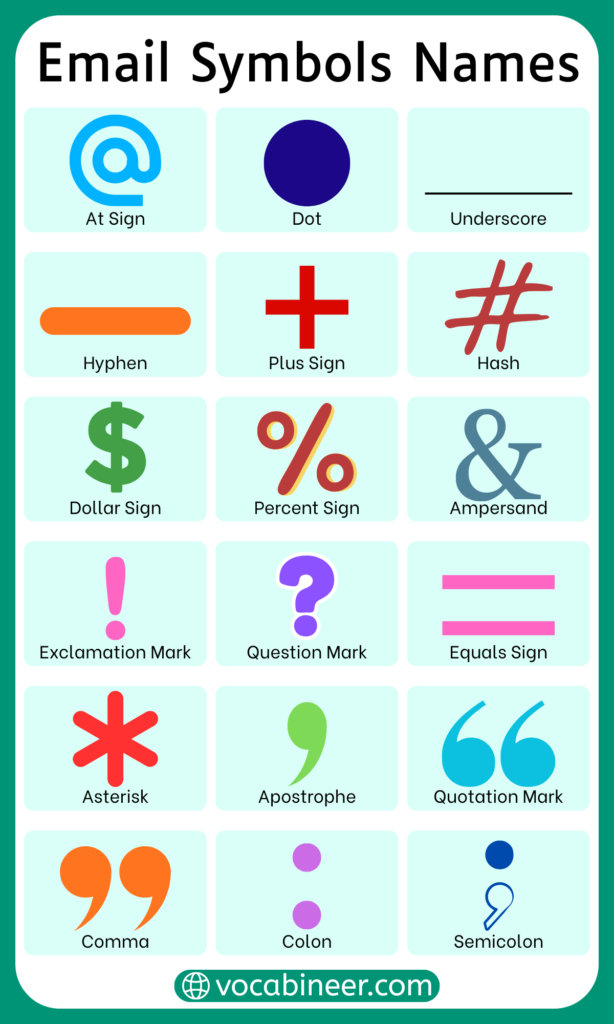
- The At symbol (@) separates the username from the domain name and is required in every email address.
- The Dot (.), also called a period, divides words in usernames and separates parts of domain names like example.com.
- The Hyphen (-) joins words or numbers and is often used when names are already taken.
- The Underscore (_) creates a clear space between words in usernames and improves readability.
- The Plus (+), known as the plus sign, is allowed by some email providers and is often used to organize or filter incoming emails.
Symbols Used in Email Usernames
Email usernames appear before the At symbol and identify the individual email account. This part allows limited symbol use so people can create readable and unique addresses when common names are already taken. Knowing both the symbol and its name helps when explaining or spelling an email address aloud.
- Letters and numbers form the base of most usernames
- The Dot (.), called the dot or period, is used to separate words like first and last names
- The Hyphen (-), also known as a hyphen or dash, joins words or numbers smoothly
- The Underscore (_), commonly called underscore, creates a clear gap between words
- The Plus (+), known as the plus sign, may be used by some providers to create email variations
- Symbols should not appear at the beginning or end of the username in most email systems
Symbols Allowed in Email Addresses
Email addresses follow strict technical rules, so only specific symbols are accepted. These symbols are recognized by email servers worldwide and help messages reach the correct inbox without errors.
- The At symbol (@), read as “at,” is required in every email address
- The Dot (.), called dot or period, separates parts of usernames and domain names
- The Hyphen (-), known as hyphen, is allowed in both usernames and domains
- The Underscore (_), called underscore, is allowed only in usernames
- The Plus (+), known as plus sign, is allowed by some email providers for filtering or sorting
Symbols Not Allowed in Email Addresses
Certain symbols are not allowed in email addresses because they can confuse email systems or cause delivery problems. These symbols are usually blocked automatically when signing up for an email account.
- Spaces, also called blank spaces, break the email format
- The Comma (,), called comma, separates values incorrectly
- The Slash (/), known as forward slash, is not permitted
- The Backslash (\), called backslash, causes system errors
- The Colon (:), known as colon, is restricted
- The Semicolon (;), called semicolon, is not supported
- Quotation marks (“), called double quotes, are invalid
- Brackets ( ), known as parentheses, are not allowed
Symbols Used Before the At Sign
The section before the At symbol is the username part of an email address. This part allows certain symbols to help separate words, names, or numbers clearly. Knowing the symbol names makes it easier to describe or dictate an email address correctly.
- The Dot (.), called dot or period, separates words such as first and last names
- The Hyphen (-), known as hyphen, connects words or numbers smoothly
- The Underscore (_), called underscore, creates a visible break between words
- The Plus (+), known as plus sign, may be used by some providers for email filtering
- Symbols should not appear at the start or end of the username in most systems
Symbols Used After the At Sign
The section after the At symbol is the domain part of the email address. This part follows stricter rules because it identifies the email service or organization and helps route messages correctly.
- The Dot (.), called dot or period, separates domain levels such as example.com
- The Hyphen (-), known as hyphen, may appear inside domain names
- Letters and numbers form the main structure of domains
- The Underscore (_) is not allowed in standard domain names
- The Plus (+) is not permitted after the At symbol
Email Domain Symbols and Characters
Email domains are built using a limited set of characters to keep addresses consistent and easy to recognize worldwide. Understanding which symbols appear in domains helps users spot valid and invalid email addresses.
- Letters are required in every domain name
- Numbers may appear in some domain names
- The Dot (.), known as dot or period, divides domain sections
- The Hyphen (-), called hyphen, may join words within domains
- Other symbols are restricted to prevent errors
Symbols Used in Professional Email Addresses
Professional email addresses are designed to look clear, simple, and trustworthy. Symbols are used carefully so the address is easy to read, remember, and share in work or business communication. Knowing the symbol names helps when spelling the address over the phone or in meetings.
- The Dot (.), called dot or period, is commonly used to separate first and last names
- The Hyphen (-), known as hyphen, may be used if names are long or repeated
- Letters are preferred over symbols for a clean look
- The Underscore (_) is rarely used in professional emails
- The Plus (+) is usually avoided in work addresses
Symbols Used in Personal Email Addresses
Personal email addresses allow more flexibility with symbols. People often use symbols to create unique usernames or reflect personal preferences while still following email rules.
- The Dot (.), called dot or period, separates words or names
- The Hyphen (-), known as hyphen, joins words or numbers
- The Underscore (_), called underscore, adds clear spacing
- The Plus (+), known as plus sign, may be used for sorting messages
- Symbols can help personalize an email address
Email Symbols Used in Business Communication
Symbols are not limited to email addresses. They are also used inside email messages to organize content and keep communication short and clear in business settings.
- The At symbol (@), read as “at,” is used to mention or tag people
- The Ampersand (&), called ampersand, joins company names or departments
- The Dash (-), known as dash, separates ideas or phrases
- The Colon (:), called colon, introduces details or lists
- Symbols help structure messages without extra words
Symbols Used in Email Subject Lines
Email subject lines often use symbols to organize information and signal importance. These symbols help readers quickly understand the purpose of the message before opening it, especially in busy inboxes.
- The Colon (:), called colon, introduces the main topic or category
- The Dash (-), known as dash, separates ideas or adds extra detail
- The Exclamation mark (!), called exclamation mark, shows urgency or emphasis
- The Question mark (?), known as question mark, signals a question
- Symbols should be used lightly to avoid a cluttered or spam-like look
Symbols Used in Email Signatures
Email signatures contain contact details and closing information, where symbols help organize content neatly. They make the signature easier to read without adding extra words.
- The Vertical bar (|), called vertical bar or pipe, separates items like name and title
- The At symbol (@), read as “at,” appears in email addresses
- The Plus (+), known as plus sign, is used in international phone numbers
- The Dash (-), called dash, separates job titles or departments
- Symbols help keep signatures short and clean
Email Symbols Used for Formatting
Symbols are often used inside email messages to add simple formatting. They help organize text when design tools are limited or unavailable.
- The Asterisk (*), called asterisk, adds emphasis to words or phrases
- The Dash (-), known as dash, creates simple bullet-style lists
- The Greater than sign (>), called greater-than sign, shows quoted replies
- The Number sign (#), known as hash or pound sign, highlights sections
- Formatting symbols improve message readability
Commonly Confused Email Symbols
Some email symbols look similar or are often mistaken for one another. This confusion can lead to typing errors, invalid email addresses, or miscommunication when sharing an address verbally.
- The Hyphen (-) is often confused with a dash, but it is shorter and used inside words
- The Underscore (_) is sometimes mistaken for a space, especially when spoken aloud
- The Dot (.) may be skipped accidentally, which can change the address
- The Plus (+) is sometimes misunderstood as part of the name rather than a filter tool
- Knowing symbol names helps avoid these common mistakes
Differences Between Email Symbols and Text Symbols
Email symbols and text symbols may look similar at first, yet they serve very different purposes in digital communication. Because email symbols follow strict technical rules, they directly affect message delivery and formatting. Text symbols, however, are used more freely to express emotion, tone, or emphasis in casual conversations.
| Aspect | Email Symbols | Text Symbols |
|---|---|---|
| Main Purpose | Used to form valid email addresses and structure emails | Used to express tone, emotion, or emphasis in messages |
| Rule Strictness | Follow strict technical rules | Have flexible usage rules |
| Placement Rules | Must appear in specific positions | Can appear anywhere in a message |
| Functional Role | Directly affect email delivery | Do not affect message delivery |
| Creativity | Limited and controlled | Highly flexible and expressive |
| Common Examples | @, ., –, _, + | !, ?, 🙂, ❤️, 😂 |
| Error Impact | Wrong symbol can break an email address | Wrong symbol usually causes no issue |
| Usage Context | Email addresses and formal email writing | Text messages, chats, and social media |
| Technical Sensitivity | Very sensitive to incorrect symbols | Not sensitive to symbol choice |
| Learning Importance | Must be learned accurately | Learned naturally through use |
Email Symbols Compared to Website Symbols
Email symbols and website symbols may look similar, but they follow different rules and serve different purposes. In emails, symbols are used to create valid addresses and structure messages correctly. Website symbols, on the other hand, appear in URLs to define paths, links, and actions. Recognizing this distinction helps users avoid errors when typing or sharing digital information.
| Aspect | Email Symbols | Website Symbols |
|---|---|---|
| Purpose | Used to create and format email addresses and email content | Used to build website links and define web paths |
| Rule Strictness | Follow strict formatting rules set by email systems | More flexible and widely accepted in URLs |
| Commonly Used Symbols | @, ., –, _, + | /, ?, =, &, #, : |
| Symbol Placement | Symbols must appear in specific positions | Symbols can appear in multiple parts of a URL |
| Use of Slash | Slash (/) is not allowed in email addresses | Slash (/) is essential in website links |
| Underscore Usage | Allowed only in usernames | Allowed in URLs and file names |
| Security Sensitivity | Very sensitive to invalid symbols | More tolerant of special characters |
| Error Impact | Wrong symbol can break the email address | Wrong symbol may still load a page or redirect |
| Visual Similarity | Symbols look simple and limited | Symbols appear more frequently and in clusters |
| User Mistakes | Mixing website symbols into emails | Copying email-style text into URLs |
When to Use Symbols in Email Writing?
Symbols should be used in email writing only when they clearly improve structure or understanding. In professional and personal emails, symbols help shorten messages, organize ideas, and highlight key details without adding extra words. For example, the At symbol (@) is useful when mentioning people directly, while the Colon (:) helps introduce a subject or explanation. The Dash (-) is often used to separate related ideas in a sentence. Limiting symbol use and placing them carefully keeps emails clean, readable, and professional, especially in formal communication.
Mistakes to Avoid When Using Email Symbols
Using symbols incorrectly can cause email delivery problems or make messages confusing. One common mistake is adding spaces inside an email address, which makes it invalid. Another issue is using symbols that email systems do not support, such as commas or slashes. Placing symbols in the wrong position, like at the beginning or end of a username, can also break an email address. Repeating symbols unnecessarily or ignoring email provider rules may lead to errors. Paying attention to correct symbol use helps emails work smoothly and look reliable.
FAQs About Email Symbols Names
The At symbol (@) is required in every email address because it separates the username from the domain. The Dot (.) is also essential in most domain names.
Symbols such as spaces, commas, slashes, colons, semicolons, quotation marks, and brackets are not allowed because they interfere with email formatting.
Symbols can appear before the At symbol (@) in the username and, in limited cases, inside the domain. Placement rules depend on the symbol and the email provider.
Common symbols are read as “at” for (@), “dot” for (.), “hyphen” for (-), “underscore” for (_), and “plus” for (+) when spelling an email address.
Correct placement ensures the email address is valid and messages reach the correct inbox. Incorrect placement can cause delivery failures.
Conclusion
Email symbols names explain how special characters function in email addresses and written communication. Understanding which symbols are allowed, where they appear, and how they are used helps people create valid email addresses, write clearer emails, and avoid common mistakes. Correct symbol use supports smooth, accurate, and professional digital communication.
Read More